
Browser-Native Agents and LLMs: The Complete Technical Guide to Running AI Entirely in Your Browser (2026)
The browser is now a production AI runtime. This guide covers every layer — WebGPU acceleration, WebLLM and Transformers.js inference, Chrome's Gemini Nano APIs, small language models, agent reasoning loops, and the WebMCP standard — with working code.
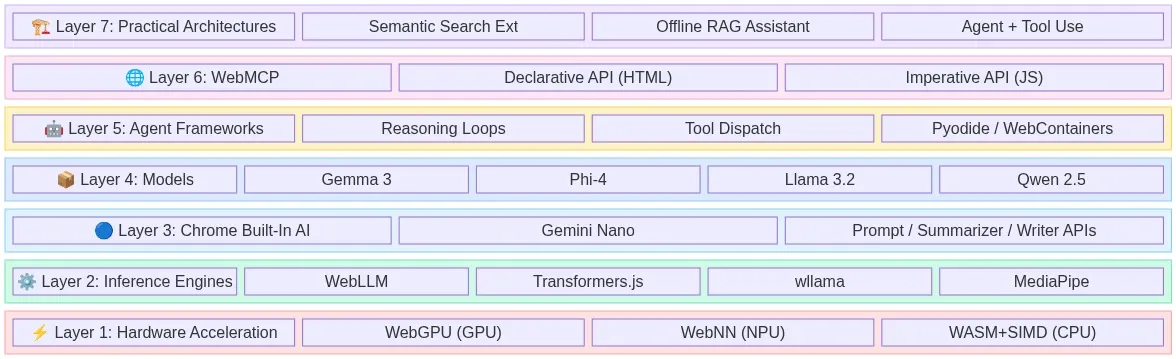
Browser-Native Agents and LLMs: The Complete Technical Guide to Running AI Entirely in Your Browser (2026)
Table of Contents
- The Browser Is the New Runtime
- Layer 1: Hardware Acceleration, WebGPU, WebNN, and WASM
- Layer 2: Inference Engines That Run Models in Tabs
- Layer 3: Chromes Built-In AI and Gemini Nano
- Layer 4: Models That Actually Fit the Browser
- Layer 5: Browser-Native Agents and Reasoning Loops
- Layer 6: WebMCP Makes Websites Agent-Ready
- Layer 7: Practical Architectures You Can Build Today
- The Emerging Agentic Browser Landscape
- Constraints, Trade-offs, and What's Not Ready Yet
- What's Coming Next
- Conclusion
The Browser Is the New Runtime
Something fundamental shifted in the last eighteen months. The web browser — once a thin client for rendering documents and making API calls — has become a legitimate AI runtime. Not a demo. Not a toy. A production-grade environment where large language models run inference, autonomous agents reason through multi-step tasks, and entire semantic pipelines execute without a single byte leaving the user's device.
The economics tell the story plainly. One production deployment reported cutting a $12,000 monthly inference bill to zero by moving LLM inference to the client. But cost isn't even the primary driver anymore — it's privacy regulation, offline capability, and the sheer architectural simplicity of eliminating backend infrastructure for AI workloads.
This post is a deep technical walkthrough of every layer in the browser-native AI stack as it exists today in April 2026: the hardware acceleration APIs, the inference engines, the models that actually fit, the agent frameworks that orchestrate reasoning loops, the emerging web standards that make websites agent-ready, and the practical patterns for building all of it right now.
The Full Stack at a Glance
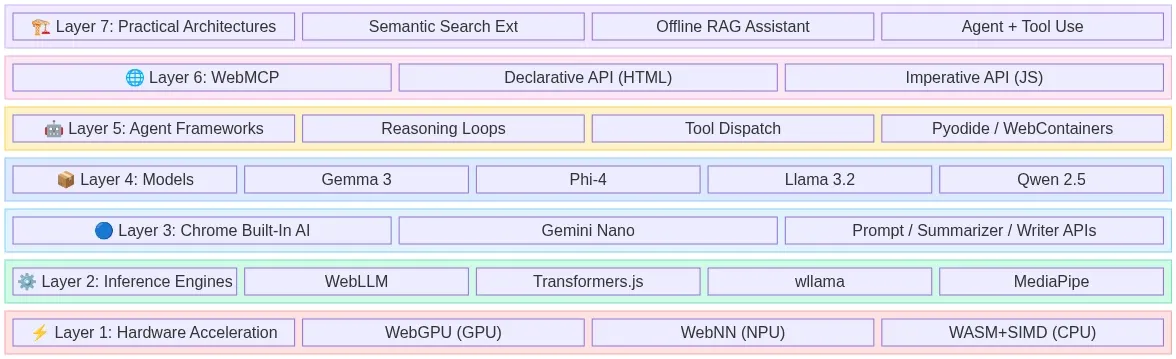
Fig 1: The 7-layer browser-native AI stack — from hardware acceleration to production architectures — wowdata.science
Layer 1: Hardware Acceleration, WebGPU, WebNN, and WASM
Running neural networks in a browser tab requires direct access to the device's parallel compute hardware. Three web standards make this possible, each targeting a different execution backend.
WebGPU: The GPU Compute Layer
WebGPU is the successor to WebGL and the primary workhorse for browser-based AI in 2026. It provides a low-level, high-performance interface that grants JavaScript direct access to the device's native Graphics Processing Unit. Unlike WebGL, which was designed for rendering graphics, WebGPU was built from the ground up to support general-purpose GPU computation — exactly what matrix multiplication in transformer models demands.
By 2026, WebGPU support is stable across Chrome, Edge, and Firefox, with Safari gradually expanding compatibility. The performance gains are not incremental — they are transformational. Benchmarks comparing embedding generation via WebGPU versus WebAssembly show 40x to 75x speedups depending on the local hardware, from integrated Intel graphics to discrete Apple Silicon or NVIDIA GPUs.
For LLM inference specifically, WebGPU enables token generation rates that make interactive chat viable directly in a browser tab. The key architectural insight is that WebGPU maps cleanly onto the same compute shaders that native CUDA and Metal implementations use, so the performance gap between browser and native inference continues to narrow.
// Checking for WebGPU support before initializing inference
if (!navigator.gpu) {
  console.warn('WebGPU not supported — falling back to WASM backend');
} else {
  const adapter = await navigator.gpu.requestAdapter();
  const device = await adapter.requestDevice();
  console.log(`GPU: ${adapter.info?.device || 'unknown'}`);
  console.log(`Max buffer size: ${device.limits.maxBufferSize / 1e9} GB`);
}
WebNN: The Neural Processing Unit Gateway
While WebGPU targets the GPU, the Web Neural Network API (WebNN) targets a different class of hardware entirely: dedicated Neural Processing Units (NPUs) that ship in modern laptops and mobile devices. NPUs are purpose-built silicon optimized for the specific matrix operations that neural networks require, offering superior power efficiency compared to general-purpose GPU compute.
WebNN is currently a W3C Candidate Recommendation and is the only web API that enables direct NPU access. As of early 2026, Microsoft deprecated DirectML in favor of routing WebNN through Windows ML to access OpenVINO and other execution providers for hardware acceleration. Chrome and Edge have the most mature implementations.
The practical significance: on devices with NPUs (Intel Core Ultra, Qualcomm Snapdragon X, Apple M-series), WebNN can execute small model inference with dramatically lower power consumption than WebGPU, making it ideal for always-on background tasks like real-time text classification or continuous summarization.
WebAssembly (WASM): The Universal Fallback
WebAssembly remains the universal baseline. Every browser supports it. Every device can run it. WASM executes neural network operations on the CPU at near-native speed, with SIMD (Single Instruction, Multiple Data) extensions providing meaningful vectorization for tensor operations.
WASM won't match WebGPU's throughput for large models, but it serves two critical roles: it's the fallback for devices without GPU support, and it's the compilation target for non-JavaScript inference engines. Libraries like wllama compile llama.cpp directly to WebAssembly, bringing the entire GGUF model ecosystem to the browser without any JavaScript reimplementation.
// wllama: llama.cpp compiled to WASM for browser inference
import { Wllama } from '@wllama/wllama';

const wllama = new Wllama({
  'single-thread/wllama.wasm': '/wllama-single.wasm',
  'multi-thread/wllama.wasm': '/wllama-multi.wasm',
});

await wllama.loadModelFromUrl(
  'https://huggingface.co/user/model/resolve/main/model-q4_k_m.gguf',
  { n_ctx: 2048 }
);

const response = await wllama.createCompletion('Explain browser-native AI:', {
  nPredict: 256,
  sampling: { temp: 0.7 },
});
| API | Target Hardware | Browser Support (2026) | Best For |
|---|---|---|---|
| WebGPU | GPU (discrete + integrated) | Chrome, Edge, Firefox stable; Safari partial | LLM inference, embedding generation, heavy compute |
| WebNN | NPU / dedicated AI accelerators | Chrome, Edge (behind flags in some configs) | Power-efficient background inference, always-on tasks |
| WASM + SIMD | CPU | Universal | Fallback, llama.cpp ports, maximum compatibility |
Architecture: Hardware Acceleration Dispatch
The following diagram shows how a browser AI application selects the optimal hardware backend at runtime, cascading through available APIs from highest performance to universal fallback:
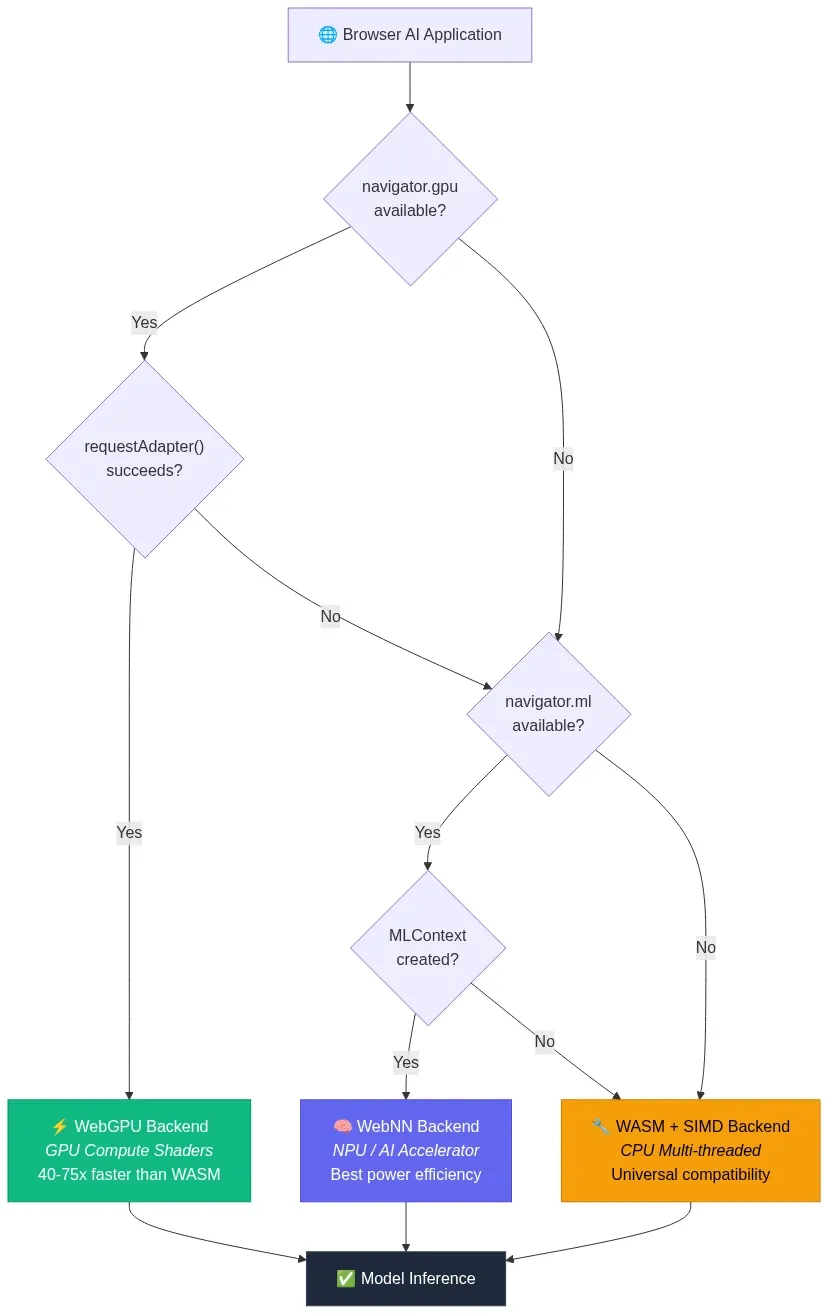
Fig 2: Hardware acceleration dispatch — runtime fallback from WebGPU to WebNN to WASM — wowdata.science
Layer 2: Inference Engines That Run Models in Tabs
Hardware APIs are useless without software that knows how to load model weights, tokenize input, execute the forward pass, and stream output tokens. Four inference engines dominate the browser landscape in 2026.
WebLLM: The OpenAI-Compatible In-Browser Engine
WebLLM from MLC AI is the most mature browser-native LLM inference engine, with 17,000+ GitHub stars and active development. It leverages WebGPU for GPU acceleration and WASM for CPU fallback, providing an OpenAI-compatible chat completions API that makes migration from cloud endpoints trivial.
WebLLM achieves up to 80% of native inference performance on the same device. It supports streaming responses, JSON mode, and function calling — the same capabilities developers rely on from cloud APIs, running entirely in a browser tab.
The model compilation pipeline uses Apache TVM to convert models from their original formats into optimized WebGPU shader programs. Pre-compiled models are available for Llama, Gemma, Phi, Qwen, Mistral, and others in various quantization levels.
import { CreateMLCEngine } from '@mlc-ai/web-llm';

// Initialize with a pre-compiled model
const engine = await CreateMLCEngine('Llama-3.2-3B-Instruct-q4f16_1-MLC', {
  initProgressCallback: (progress) => {
    console.log(`Loading: ${(progress.progress * 100).toFixed(1)}%`);
  },
});

// Use the standard OpenAI chat completions API
const response = await engine.chat.completions.create({
  messages: [
    { role: 'system', content: 'You are a helpful assistant.' },
    { role: 'user', content: 'What can you do running in my browser?' },
  ],
  temperature: 0.7,
  max_tokens: 512,
  stream: true,
});

// Stream tokens to the UI
for await (const chunk of response) {
  const delta = chunk.choices[0]?.delta?.content || '';
  process.stdout.write(delta);
}
Transformers.js: The Hugging Face Ecosystem in JavaScript
Transformers.js is the JavaScript equivalent of the Python transformers library. Version 3 shipped with WebGPU support and over 120 supported architectures. Version 4 is now available with even more model support. The library executes ONNX-format models via onnxruntime-web, supporting both WASM and WebGPU backends.
Transformers.js excels at task-specific pipelines — embeddings, classification, summarization, translation, image segmentation, speech recognition — rather than open-ended chat. It's the go-to choice for embedding models like nomic-embed-text-v1.5, sentence transformers, and specialized vision models.
import { pipeline } from '@huggingface/transformers';

// Feature extraction with WebGPU acceleration
const extractor = await pipeline('feature-extraction',
  'nomic-ai/nomic-embed-text-v1.5', {
    dtype: 'q8',           // 8-bit quantization
    device: 'webgpu',      // GPU acceleration
  }
);

// Generate embeddings with task-specific prefixes
const docEmbedding = await extractor(
  'search_document: Browser-native AI eliminates server dependencies',
  { pooling: 'mean', normalize: true }
);

const queryEmbedding = await extractor(
  'search_query: How does in-browser AI work?',
  { pooling: 'mean', normalize: true }
);
wllama: llama.cpp in Your Browser
wllama takes a fundamentally different approach. Rather than building a new inference engine, it compiles the battle-tested llama.cpp C++ codebase directly to WebAssembly. This means every GGUF-quantized model on Hugging Face — and there are thousands — works in the browser without any conversion step.
wllama runs on CPU via WASM SIMD with zero runtime dependencies. It supports multi-threaded execution via SharedArrayBuffer, context sizes up to the model's maximum, and the full range of GGUF quantization formats (Q4_K_M, Q5_K_M, Q8_0, etc.). For developers who need maximum model compatibility and don't require GPU acceleration, wllama is the pragmatic choice.
MediaPipe LLM Inference API: Google's On-Device Solution
Google's MediaPipe LLM Inference API provides a cross-platform approach to on-device LLM execution. It supports web, Android, and iOS with a unified API surface. On the web, it leverages WebGPU for acceleration and supports models including Gemma, Phi, and other architectures.
MediaPipe's key differentiator is its integration with Google's broader AI Edge ecosystem, including optimized model formats and automatic hardware dispatch. Research from Google demonstrated 7B+ parameter models running in the browser using this stack.
| Engine | Backend | API Style | Model Format | Best For |
|---|---|---|---|---|
| WebLLM | WebGPU + WASM | OpenAI-compatible | MLC-compiled | Chat, function calling, streaming |
| Transformers.js | ONNX Runtime (WebGPU/WASM) | Pipeline-based | ONNX | Embeddings, classification, task-specific |
| wllama | WASM SIMD | Custom | GGUF | Maximum model compatibility, CPU-only |
| MediaPipe | WebGPU | Task-based | TFLite/custom | Cross-platform, Google ecosystem |
Architecture: How Inference Engines Bridge Models to the Browser
Each engine takes a different path from model weights on disk to tensor operations on hardware. This diagram maps the data flow from the original model format through the engine's compilation/conversion pipeline to the hardware execution backend:
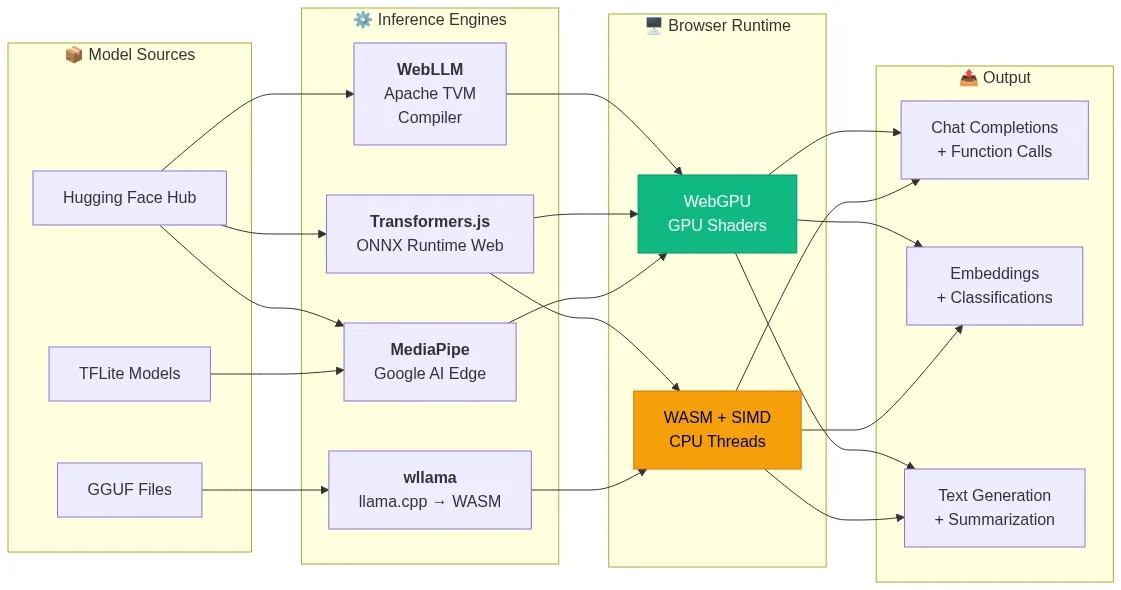
Fig 3: Inference engine data flow — model formats through compilation pipelines to browser hardware backends — wowdata.science
Layer 3: Chromes Built-In AI and Gemini Nano
While the engines above require developers to download and manage models, Chrome has taken a radical step: shipping a language model directly inside the browser itself.
Starting with Chrome 137 and stabilizing in Chrome 138+, Google embedded Gemini Nano — a small, efficient language model — directly into the browser binary. It's exposed through a suite of native JavaScript APIs that require no model downloads, no API keys, and no configuration:
- Prompt API — General-purpose text generation via
LanguageModel.create(). Send natural language requests to Gemini Nano and receive streaming responses. - Summarizer API — Summarize text as TL;DR, key points, teasers, or headlines.
- Writer API — Generate new content based on prompts and context.
- Rewriter API — Revise and restructure existing text.
- Translator API — Translate between language pairs using local models.
- Proofreader API — Check and correct English text.
- Language Detector API — Identify the language of input text.
// Chrome Built-in AI: Summarizer API
if ('Summarizer' in self) {
  const summarizer = await Summarizer.create({
    type: 'tl;dr',        // 'tl;dr' | 'key-points' | 'teaser' | 'headline'
    length: 'medium',      // 'short' | 'medium' | 'long'
  });

  const summary = await summarizer.summarize(articleText);
  console.log(summary);
}

// Chrome Built-in AI: Prompt API for general-purpose generation
if ('LanguageModel' in self) {
  const session = await LanguageModel.create({
    systemPrompt: 'You are a helpful coding assistant.',
  });

  const stream = session.promptStreaming('Explain WebGPU in 3 sentences.');
  for await (const chunk of stream) {
    document.getElementById('output').textContent = chunk;
  }
}
The significance of built-in AI cannot be overstated. It eliminates the cold-start problem entirely — there's no model to download, no WASM to compile, no WebGPU shaders to warm up. The model is already on the device. For lightweight tasks like summarization, translation, and text classification, this is the fastest path to browser-native AI with zero friction.
The current limitations are real: Gemini Nano is a small model with constrained capabilities compared to cloud-hosted frontier models, the APIs work only on desktop Chrome (Windows, macOS, Linux, ChromeOS), and the Prompt API requires minimum hardware specs (4GB+ RAM, specific GPU requirements). But for the use cases it targets — progressive enhancement of web applications with AI features — it's a paradigm shift.
Architecture: Chrome Built-In AI API Surface
Chrome's built-in AI exposes a layered API surface where each specialized API delegates to Gemini Nano running on-device. The developer never manages model lifecycle — Chrome handles download, caching, and hardware dispatch internally:
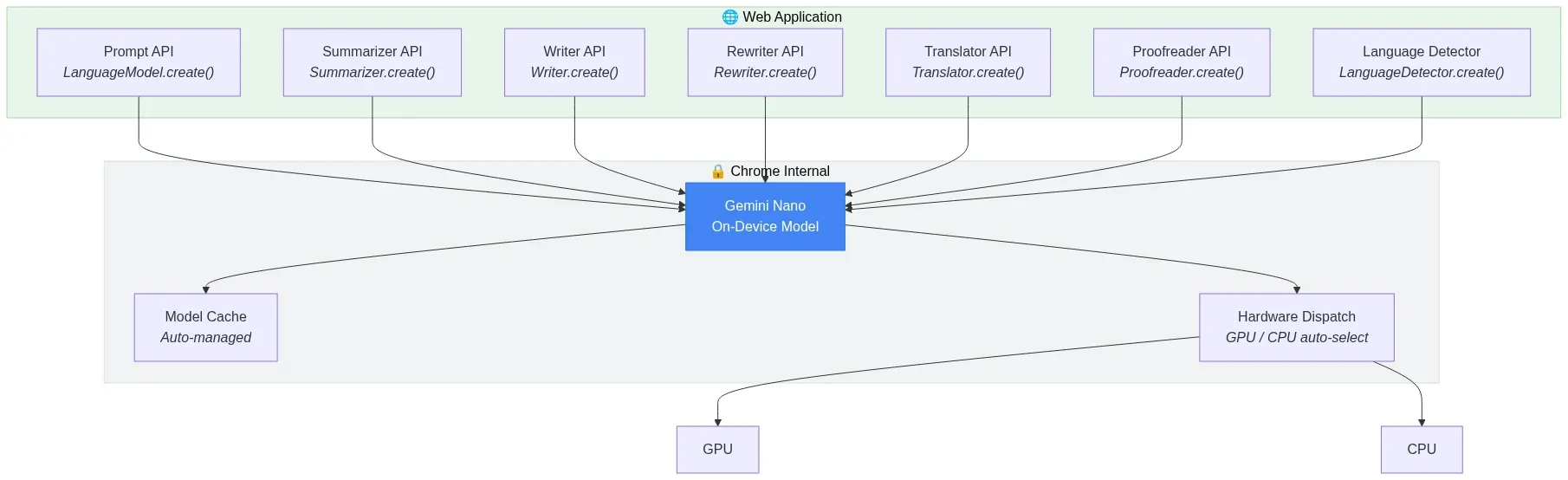
Fig 4: Chrome Built-In AI API surface — specialized APIs delegating to Gemini Nano on-device — wowdata.science
Layer 4: Models That Actually Fit the Browser
Running a 70B parameter model in a browser tab isn't happening. The practical ceiling for browser-based inference in 2026 is roughly 1B to 7B parameters, depending on quantization and available VRAM. Fortunately, the small language model (SLM) ecosystem has matured dramatically.
The Browser-Viable Model Families
The key SLM families as of 2026 include:
- Google Gemma 3 (1B, 4B variants) — Excellent instruction following, strong multilingual support, optimized for on-device deployment. The 4B variant runs comfortably in browser tabs with 8GB+ system RAM.
- Microsoft Phi-4 (3.8B) — Punches well above its weight class in reasoning and code generation. Quantized to INT4, it fits within browser memory budgets.
- Meta Llama 3.2 (1B, 3B) — The most widely supported model family across inference engines. The 1B variant is particularly well-suited for resource-constrained browser environments.
- Alibaba Qwen 2.5 (0.5B, 1.5B, 3B) — Strong multilingual capabilities, competitive performance at small sizes.
- Mistral (7B) — At the upper end of browser viability, requiring discrete GPU and 16GB+ RAM, but offering near-cloud-quality responses.
- SmolLM2 (135M, 360M, 1.7B) — Purpose-built for edge deployment, the smallest variants load in seconds and run on virtually any hardware.
Quantization: Making Models Fit
Raw model weights in FP32 are far too large for browser delivery. Quantization compresses weights to lower precision formats, trading minimal quality loss for dramatic size reductions:
| Format | Bits per Weight | ~Size for 3B Model | Quality Impact |
|---|---|---|---|
| FP32 | 32 | ~12 GB | Baseline |
| FP16 | 16 | ~6 GB | Negligible |
| INT8 (Q8_0) | 8 | ~3 GB | Minimal |
| INT4 (Q4_K_M) | 4 | ~1.7 GB | Small but measurable |
| INT4 (Q4_0) | 4 | ~1.5 GB | Moderate |
For browser deployment, INT4 quantization (Q4_K_M or q4f16) is the sweet spot. A 3B parameter model compressed to INT4 weighs roughly 1.7 GB — large for a web asset, but manageable with proper caching strategies. The quality degradation at INT4 is measurable on benchmarks but rarely noticeable in practical chat and instruction-following tasks.
Caching: Download Once, Run Forever
The initial model download is the primary UX bottleneck. A 1.7 GB payload over broadband takes 30-90 seconds. But this cost is paid exactly once.
Production browser AI applications use Service Workers with the CacheStorage API to persist model weights as permanent local assets. The Service Worker intercepts all fetch requests for model files, serves them from local cache on subsequent visits, and enables complete offline functionality. Combined with IndexedDB for storing KV-cache state, this creates a truly persistent local AI runtime.
// Service Worker: Cache model weights for offline use
self.addEventListener('fetch', (event) => {
  if (event.request.url.includes('/models/')) {
    event.respondWith(
      caches.open('ai-models-v1').then(async (cache) => {
        const cached = await cache.match(event.request);
        if (cached) return cached;

        const response = await fetch(event.request);
        cache.put(event.request, response.clone());
        return response;
      })
    );
  }
});
Architecture: Model Delivery and Caching Pipeline
The first visit downloads model weights from a CDN; the Service Worker intercepts and persists them to CacheStorage. Every subsequent visit — including offline — serves the model directly from local disk, eliminating network dependency entirely:
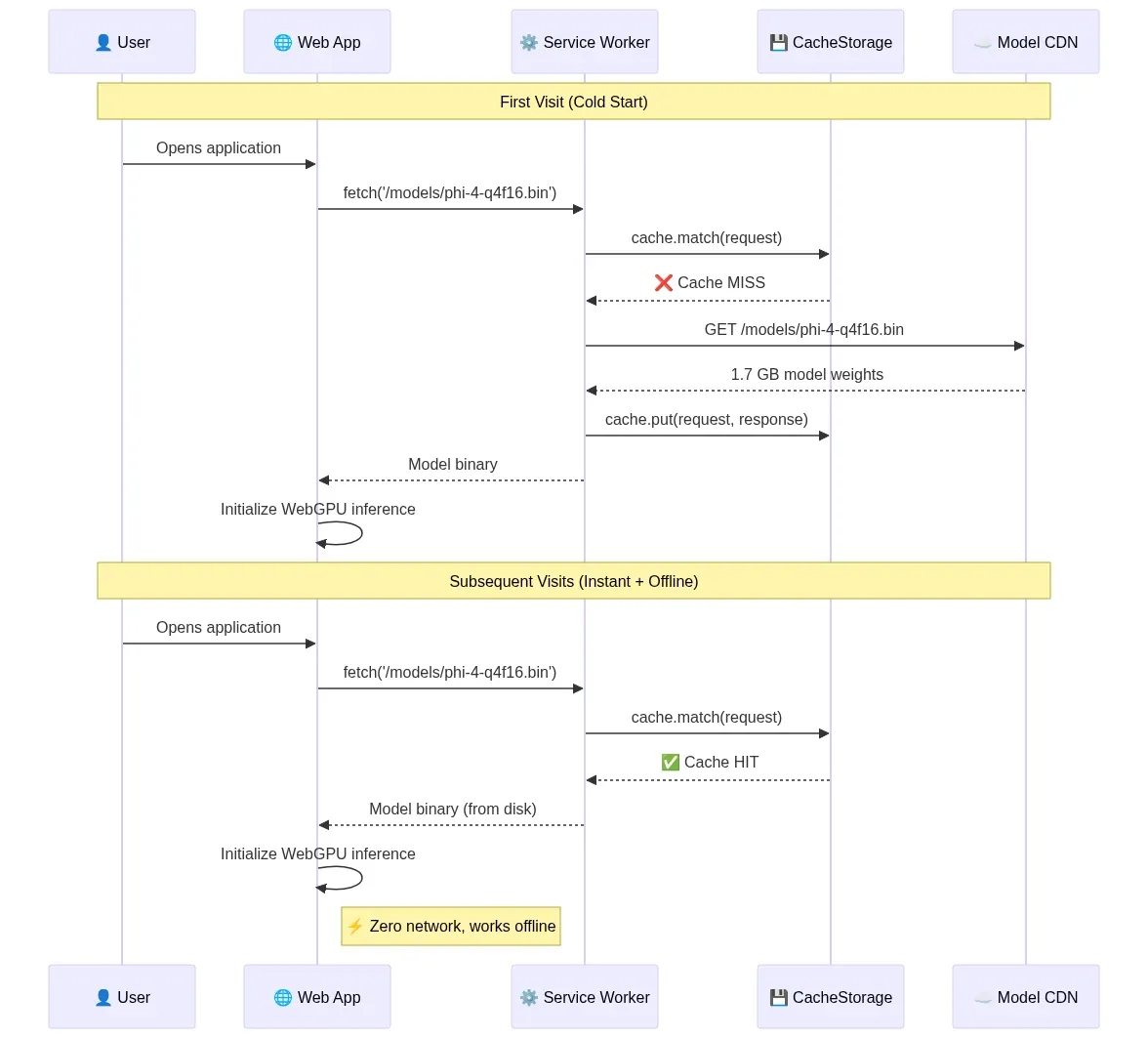
Fig 5: Model delivery and caching pipeline — cold start download vs. instant offline load via Service Worker — wowdata.science
Layer 5: Browser-Native Agents and Reasoning Loops
Having an LLM running in the browser is necessary but not sufficient. An agent requires a reasoning loop: observe the environment, decide on an action, execute it, observe the result, and repeat until the task is complete. Building this orchestration layer client-side is where the architecture gets genuinely interesting.
The 3W Stack: WebLLM + WASM + WebWorkers
Mozilla AI's research on WASM agents and the subsequent community work on the "3W" architecture established a foundational pattern for browser-native agents:
- WebLLM handles model loading and inference, providing the reasoning capability.
- WebAssembly compiles agent logic (written in Rust, Go, Python via Pyodide, or JavaScript) to near-native performance.
- WebWorkers orchestrate everything off the main thread, keeping the UI responsive while the agent reasons and acts.
The critical insight is thread architecture. LLM inference is computationally heavy and would freeze the browser's rendering thread if executed synchronously. By running inference in a dedicated Web Worker (or even a SharedWorker shared across tabs), the main thread remains free to render UI updates, handle user input, and display streaming token output.
Architecture: The 3W Thread Model
The main thread never touches inference directly. It communicates with a dedicated Agent Worker via postMessage. The Agent Worker owns the reasoning loop and delegates GPU-heavy inference to WebLLM, which internally manages WebGPU compute shaders. This separation keeps the UI at 60fps even during multi-turn agent execution:
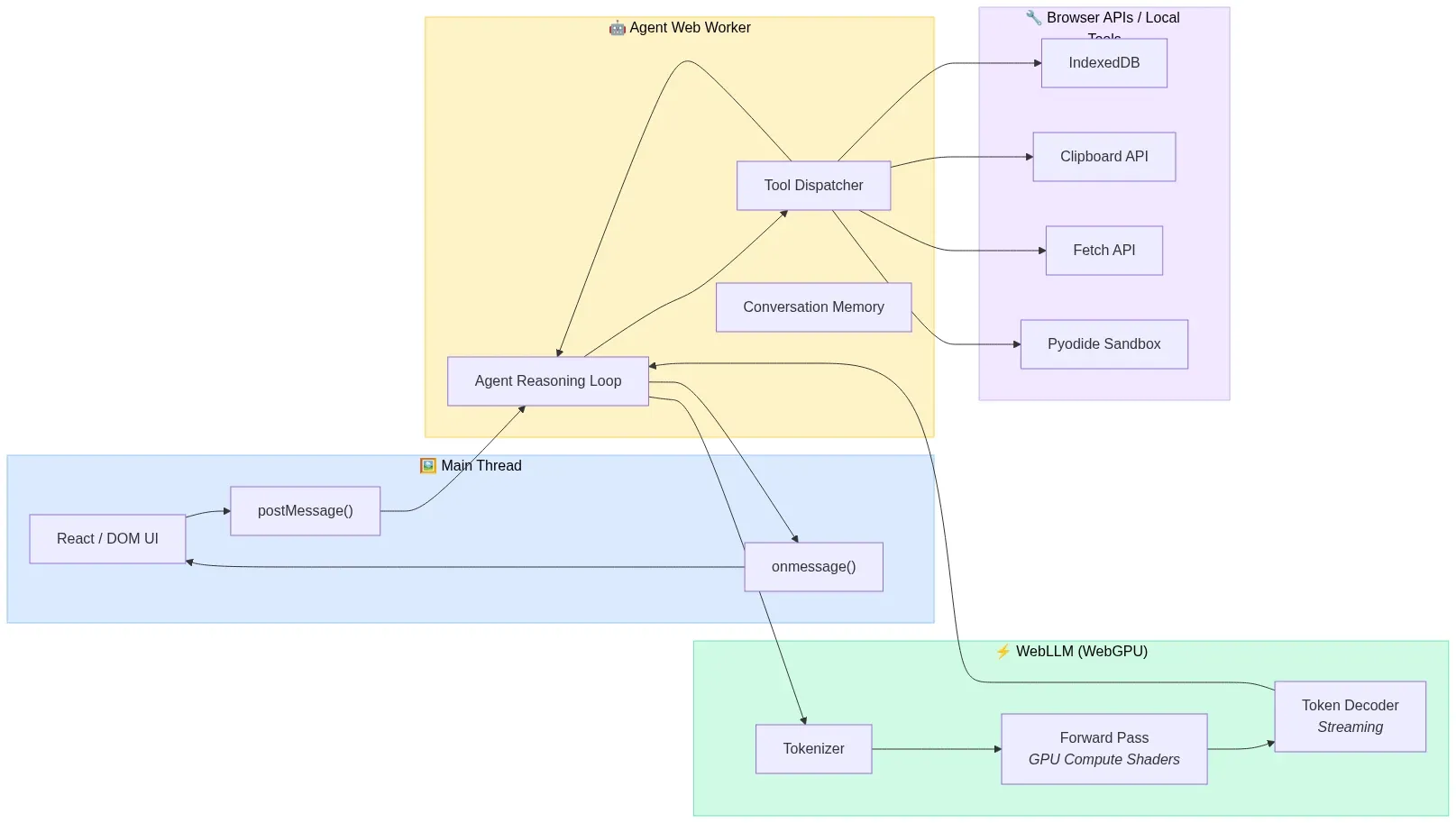
Fig 6: The 3W thread model — Main Thread, Agent Worker, and WebLLM inference separated for 60fps UI — wowdata.science
// Main thread: Spawn agent worker
const agentWorker = new Worker('/agent-worker.js', { type: 'module' });

agentWorker.postMessage({
  type: 'execute_task',
  task: 'Summarize the last 5 articles I bookmarked and identify common themes',
  tools: ['readBookmarks', 'fetchPageContent', 'semanticSearch'],
});

agentWorker.onmessage = (event) => {
  if (event.data.type === 'token') {
    appendToUI(event.data.content);
  } else if (event.data.type === 'tool_call') {
    showToolExecution(event.data.tool, event.data.args);
  } else if (event.data.type === 'complete') {
    showFinalResult(event.data.result);
  }
};
// agent-worker.js: Agent reasoning loop running off main thread
import { CreateMLCEngine } from '@mlc-ai/web-llm';

const engine = await CreateMLCEngine('Phi-4-mini-instruct-q4f16_1-MLC');

const tools = [
  {
    type: 'function',
    function: {
      name: 'semanticSearch',
      description: 'Search bookmarked articles by meaning',
      parameters: {
        type: 'object',
        properties: {
          query: { type: 'string', description: 'Natural language search query' },
        },
        required: ['query'],
      },
    },
  },
  // ... more tool definitions
];

async function agentLoop(task) {
  const messages = [
    { role: 'system', content: 'You are a browser assistant with access to local tools.' },
    { role: 'user', content: task },
  ];

  while (true) {
    const response = await engine.chat.completions.create({
      messages,
      tools,
      tool_choice: 'auto',
    });

    const choice = response.choices[0];

    if (choice.finish_reason === 'tool_calls') {
      for (const toolCall of choice.message.tool_calls) {
        const result = await executeLocalTool(toolCall.function.name,
          JSON.parse(toolCall.function.arguments));

        messages.push(choice.message);
        messages.push({
          role: 'tool',
          tool_call_id: toolCall.id,
          content: JSON.stringify(result),
        });

        self.postMessage({ type: 'tool_call', tool: toolCall.function.name, args: toolCall.function.arguments });
      }
    } else {
      self.postMessage({ type: 'complete', result: choice.message.content });
      break;
    }
  }
}
The 479-Line Agent Framework
A provocative piece from early 2026 titled "Your Agent Framework Is a Monolith. The Browser Doesn't Care." demonstrated a complete agent framework — reasoning loops, tool dispatch, sandboxed code execution, and multi-agent coordination — in 479 lines of JavaScript, running entirely client-side in a browser tab.
The argument is architecturally sound: the browser already provides everything an agent framework needs. It has a sandboxed execution environment (the tab), an event loop for async orchestration, Web Workers for parallelism, IndexedDB for persistent memory, the Fetch API for tool execution, and now WebGPU for local inference. The hundreds of transitive dependencies that server-side agent frameworks pull in are solving problems the browser already solved.
This doesn't mean every agent should run client-side. The inference for frontier-quality reasoning still benefits from cloud models. But the orchestration — the reasoning loop, tool dispatch, memory management, and multi-agent coordination — can run in the browser even when the LLM endpoint is remote. And when the model is small enough to run locally, the entire stack collapses into a single browser tab.
Sandboxed Code Execution with Pyodide and WebContainers
Agents that can write and execute code need sandboxing. The browser provides this natively through two mechanisms:
Pyodide compiles CPython to WebAssembly, enabling full Python execution in the browser. An agent can generate Python code, execute it via Pyodide in a sandboxed WASM environment, observe the output, and iterate — all without any server. Pyodide supports NumPy, Pandas, scikit-learn, and hundreds of other packages. NVIDIA's research validated this approach for sandboxing agentic AI workflows, noting that the WASM sandbox inherits the browser's security model and prevents cross-user contamination.
WebContainers (from StackBlitz) provide a full Node.js runtime in the browser via WASM, enabling agents to write, execute, and test JavaScript/TypeScript code in a sandboxed environment with a real filesystem, package manager, and dev server.
// Agent executes Python code via Pyodide in the browser
import { loadPyodide } from 'pyodide';

const pyodide = await loadPyodide();
await pyodide.loadPackage(['numpy', 'pandas']);

// Agent-generated code runs in WASM sandbox
const agentCode = `
import pandas as pd
import numpy as np

data = pd.DataFrame({
    'metric': ['latency', 'throughput', 'memory'],
    'webgpu': [12, 850, 1.7],
    'wasm': [180, 45, 0.8],
})
data['speedup'] = data['webgpu'] / data['wasm']
data.to_json()
`;

const result = pyodide.runPython(agentCode);
// Agent observes result and continues reasoning
Layer 6: WebMCP Makes Websites Agent-Ready
Every technology layer discussed so far focuses on what happens inside the browser. But agents need to interact with the web — booking flights, filing support tickets, searching product catalogs. Historically, this meant screen-scraping: taking screenshots, parsing DOM elements, guessing which blue rectangle is the submit button. It's fragile, slow, and absurd.
WebMCP (Web Model Context Protocol) is a proposed web standard, launched in early preview by Google on February 10, 2026 for Chrome 145+, that fundamentally changes this dynamic. WebMCP lets websites declare their capabilities as structured tools that AI agents can call directly — no DOM parsing, no pixel guessing, no scraping.
Two APIs for Two Complexity Levels
Architecture: WebMCP Interaction Flow
When a browser agent encounters a WebMCP-enabled website, it discovers available tools through a structured protocol rather than parsing visual layout. The agent calls tools with typed parameters and receives structured responses — identical to how it invokes local tools:
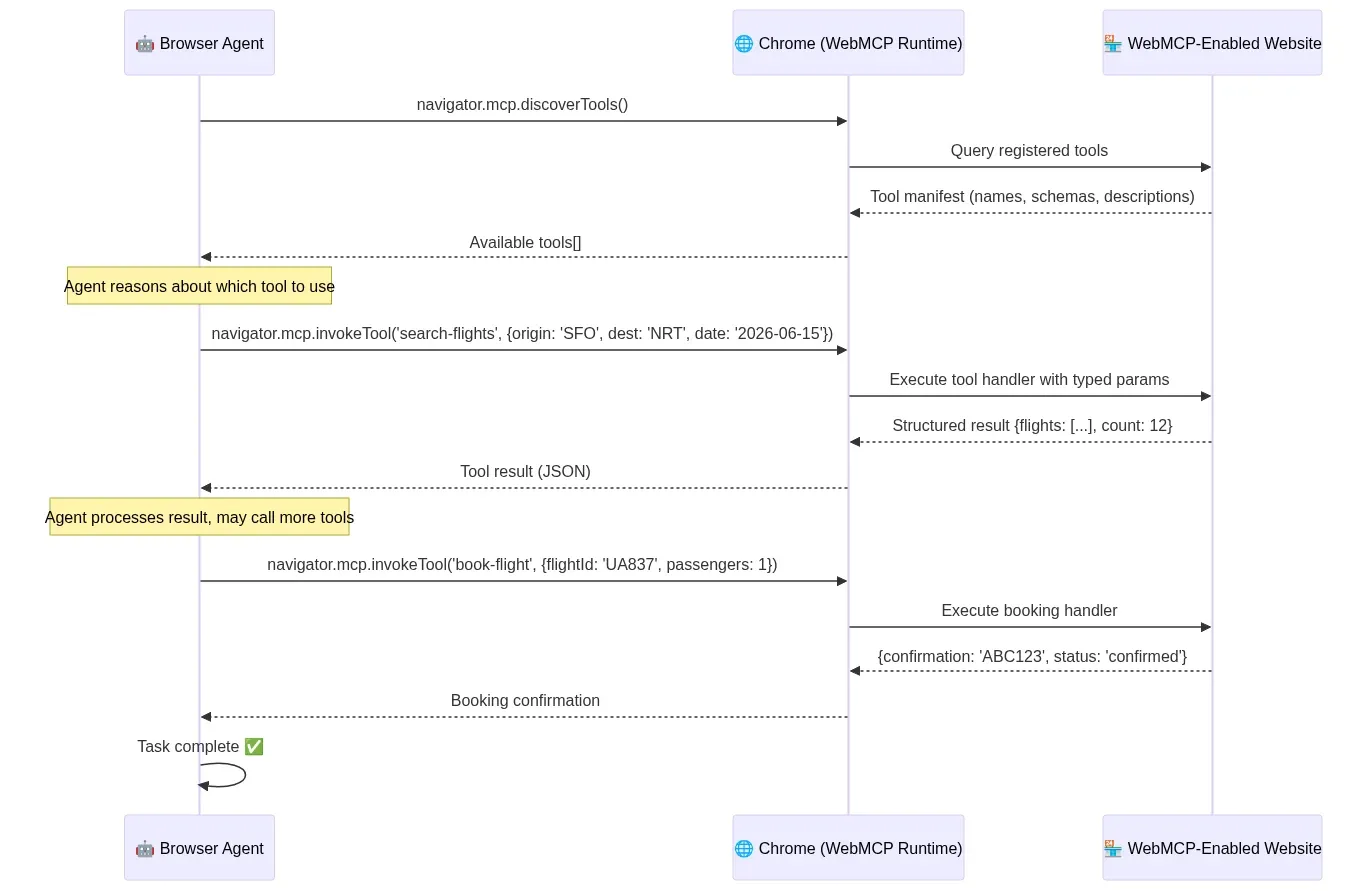
Fig 7: WebMCP interaction flow — structured tool discovery, invocation, and response between agent and website — wowdata.science
Declarative API — For standard actions that map to HTML forms. A website annotates existing forms with structured metadata, and the browser's agent can invoke them directly:
<!-- Declarative WebMCP: Turn an HTML form into an agent-callable tool -->
<form mcptool="search-flights" mcpdescription="Search for available flights">
  <input name="origin" type="text" mcpdescription="Departure airport code (IATA)" required />
  <input name="destination" type="text" mcpdescription="Arrival airport code (IATA)" required />
  <input name="date" type="date" mcpdescription="Departure date" required />
  <button type="submit">Search</button>
</form>
Imperative API — For complex, dynamic interactions that require JavaScript execution:
// Imperative WebMCP: Register a tool via JavaScript
navigator.mcp.registerTool({
  name: 'configure-product',
  description: 'Configure a custom product with specific options',
  parameters: {
    type: 'object',
    properties: {
      productId: { type: 'string', description: 'Product SKU' },
      color: { type: 'string', enum: ['red', 'blue', 'black'] },
      size: { type: 'string', enum: ['S', 'M', 'L', 'XL'] },
      quantity: { type: 'integer', minimum: 1, maximum: 10 },
    },
    required: ['productId', 'color', 'size'],
  },
  handler: async (params) => {
    const result = await addToCart(params);
    return { success: true, cartId: result.id, total: result.total };
  },
});
Why WebMCP Matters
The implications are profound. Bots now make up 51% of web traffic. The web was designed for human eyes and human clicks, but the majority of its consumers are now automated. WebMCP acknowledges this reality and provides a structured interface that's faster, more reliable, and more precise than DOM manipulation.
For browser-native agents, WebMCP is the missing piece. An agent running locally via WebLLM can now navigate to a WebMCP-enabled website and interact with it through structured tool calls — the same pattern it uses for local tools. The agent doesn't need to "see" the page. It queries the available tools, selects the appropriate one, provides structured parameters, and receives structured results. This is how the agentic web should work.
WebMCP is jointly developed by Google and Microsoft under the W3C Web Machine Learning Community Group, signaling serious standardization intent. Chrome 146 and Edge shipped early preview support in February 2026.
Layer 7: Practical Architectures You Can Build Today
With all layers in place, here are concrete architectural patterns that are production-viable right now.
Architecture 1: Privacy-First Semantic Search Extension
A Chrome extension that semantically indexes every page the user visits, enabling natural language search over browsing history — entirely on-device.
Stack: Transformers.js + nomic-embed-text-v1.5 (256-dim MRL truncation) + PGLite (pgvector) + Offscreen Document pattern for WebGPU access.
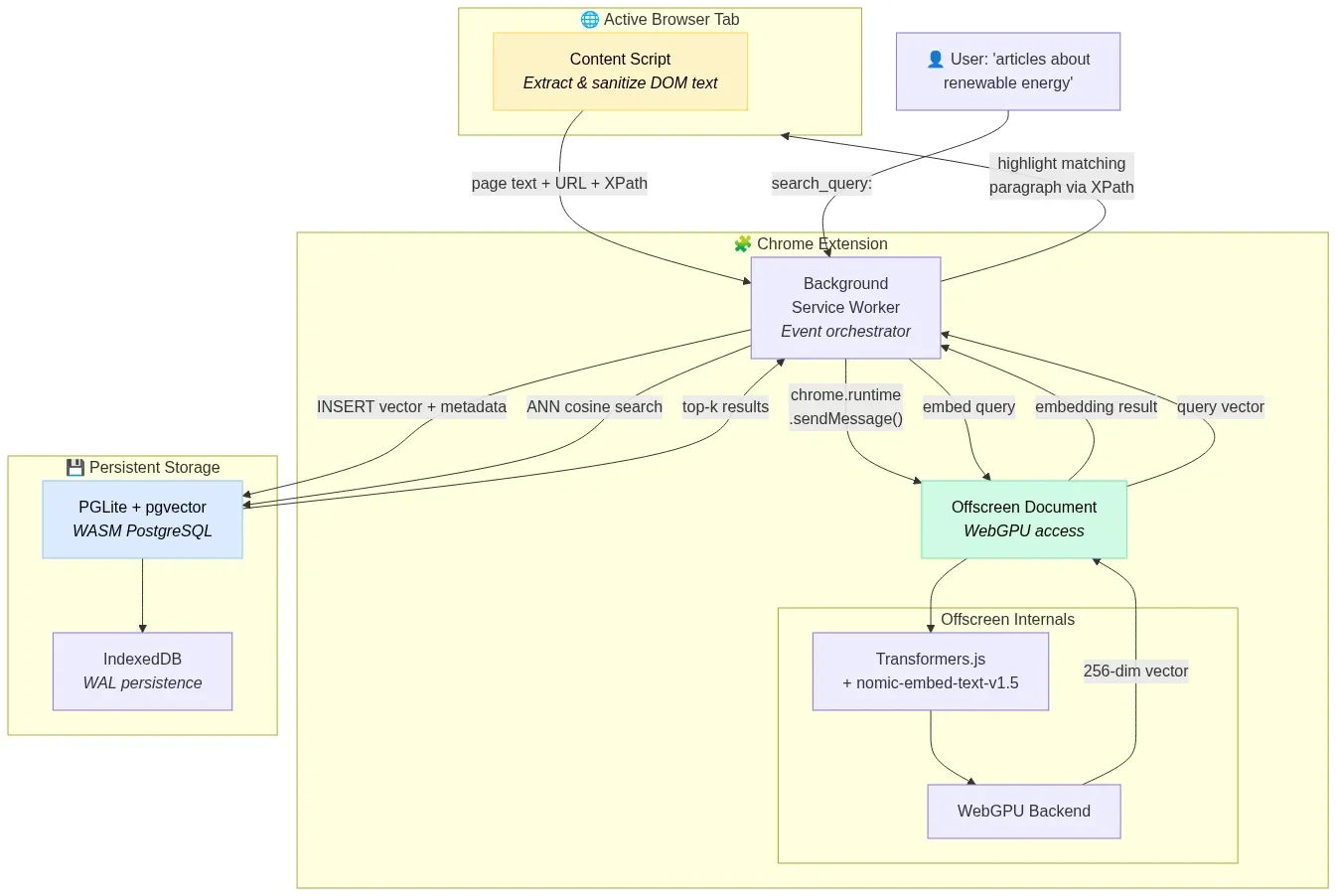
Fig 8: Privacy-first semantic search extension — Content Script to Offscreen Document to PGLite vector store — wowdata.science
How it works:
- Content Script extracts and sanitizes text from visited pages.
- Background Service Worker routes text to an Offscreen Document (required for WebGPU access in Manifest V3 extensions).
- Offscreen Document generates 256-dimensional embeddings using
nomic-embed-text-v1.5with thesearch_document:prefix. - Vectors are stored in PGLite (WASM PostgreSQL with pgvector) persisted to IndexedDB.
- User searches with natural language → query embedded with
search_query:prefix → ANN search returns semantically relevant pages.
Why 256 dimensions: Matryoshka Representation Learning allows truncating the 768-dim output to 256 dims with only 1.24 MTEB points of quality loss, reducing storage by 67% — critical for staying within IndexedDB quotas.
Architecture 2: Offline-First Documentation Assistant
A PWA that downloads a technical documentation corpus, embeds it locally, and provides a chat interface that answers questions using RAG — with zero network dependency after initial setup.
Stack: WebLLM (Phi-4-mini q4f16) + Transformers.js (nomic-embed-text-v1.5) + Orama (in-memory vector + BM25 search) + Service Worker caching.
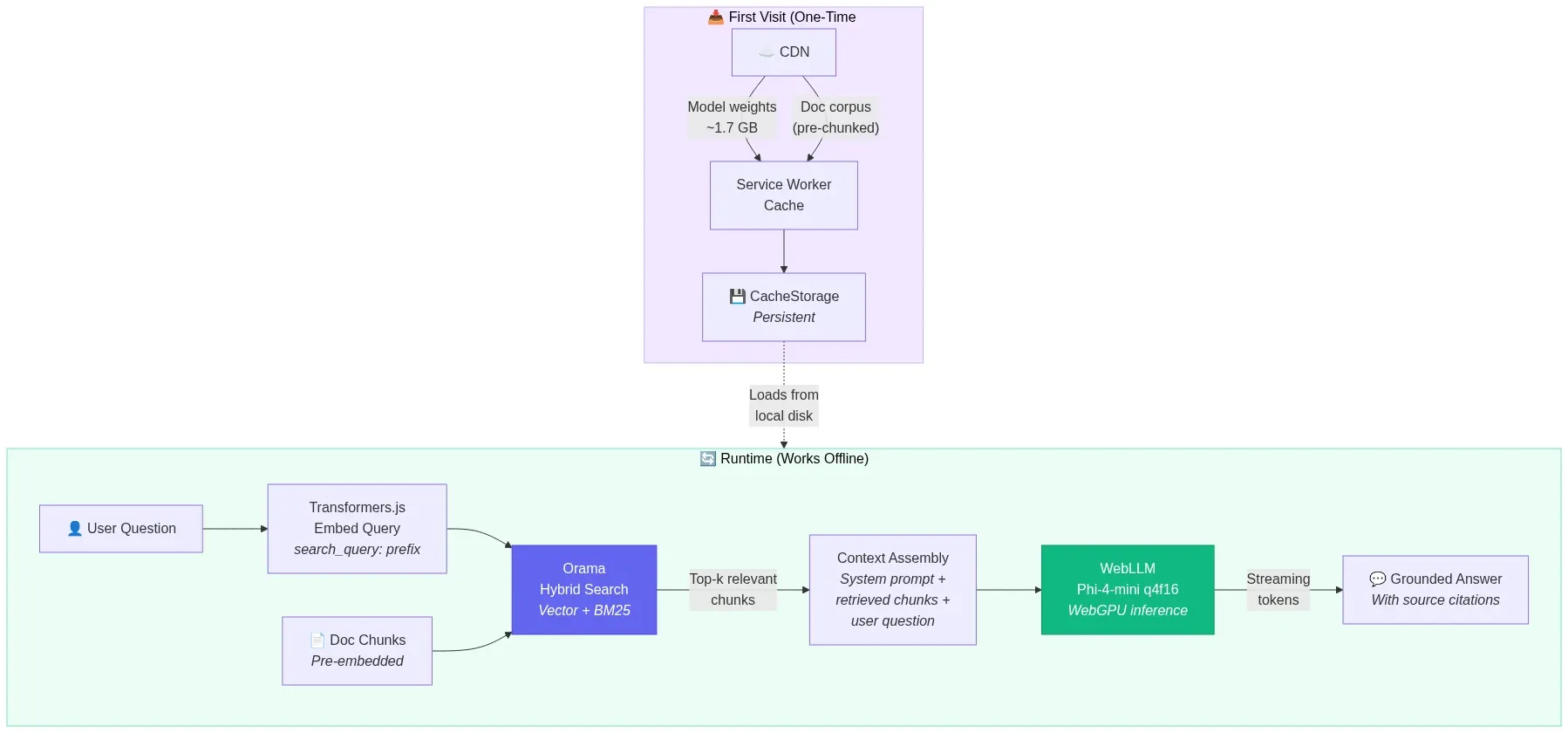
Fig 9: Offline-first RAG documentation assistant — cached model and corpus powering local retrieval-augmented generation — wowdata.science
How it works:
- On first visit, Service Worker caches the Phi-4-mini model weights (~1.7 GB) and the pre-chunked documentation corpus.
- Documentation chunks are embedded and indexed in Orama's hybrid search engine (vector + full-text BM25).
- User asks a question → query is embedded → hybrid search retrieves top-k relevant chunks → chunks are injected into Phi-4-mini's context → model generates a grounded answer.
- Everything runs offline after initial download. The PWA works on airplanes, in restricted networks, and in air-gapped environments.
Architecture 3: Client-Side Agent with Tool Use
A web application where a local LLM agent reasons through multi-step tasks using browser-native tools.
Stack: WebLLM (Llama-3.2-3B-Instruct q4f16) + WebWorker orchestration + browser APIs as tools.
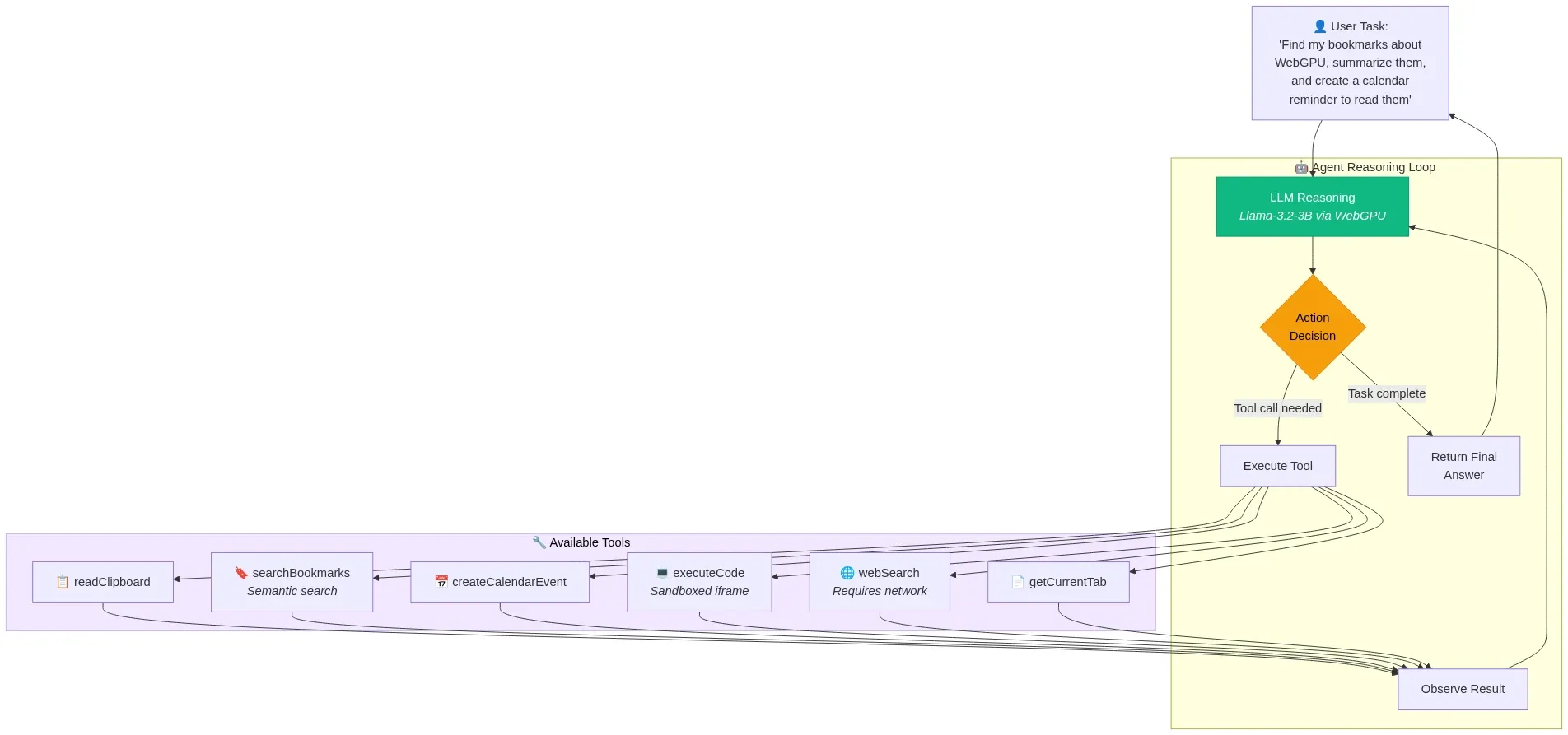
Fig 10: Client-side agent reasoning loop — LLM decides, dispatches tools, observes results, and iterates — wowdata.science
Available tools:
readClipboard— Access clipboard content (with user permission)getCurrentTab— Get the current page's URL and titlesearchBookmarks— Semantic search over locally indexed bookmarkscreateCalendarEvent— Interface with a local calendar storeexecuteCode— Run JavaScript in a sandboxed iframewebSearch— Fetch and summarize web content (the one tool requiring network)
The agent receives a natural language task, decomposes it into steps, selects and invokes tools, observes results, and iterates until the task is complete — all orchestrated in a Web Worker with the LLM running via WebGPU.
Architecture 4: Zero-Backend E-Commerce Search
A static e-commerce site where product search runs entirely in the customer's browser.
Stack: Pre-computed product embeddings (JSON) + Transformers.js (query embedding) + Orama (in-memory search).
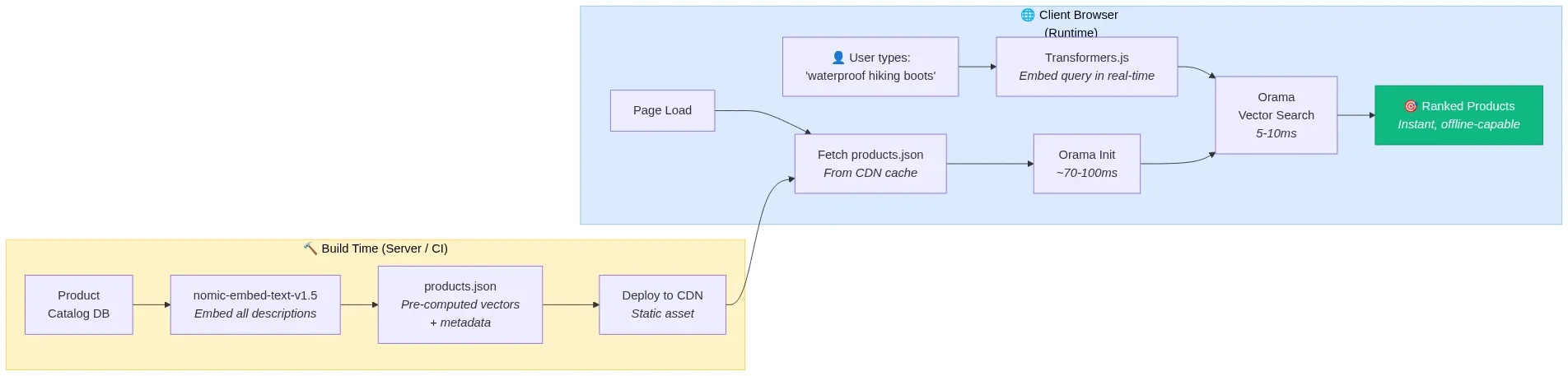
Fig 11: Zero-backend e-commerce search — build-time embeddings served as static JSON, queried client-side in milliseconds — wowdata.science
How it works:
- At build time, all product descriptions are embedded using nomic-embed-text-v1.5 and exported as a static JSON file.
- The JSON file is served from a CDN alongside the static site.
- On page load, Orama ingests the pre-computed vectors into its in-memory index (~70-100ms for thousands of products).
- As the user types, Transformers.js generates a query embedding in real-time and Orama returns semantically similar products in 5-10ms.
- Result: sub-10ms search latency, instant feedback, works offline, zero backend infrastructure, zero per-query cost.
The Emerging Agentic Browser Landscape
Beyond building agents inside browsers, the browser itself is becoming an agent. Every major tech company now has some form of AI-powered browser automation:
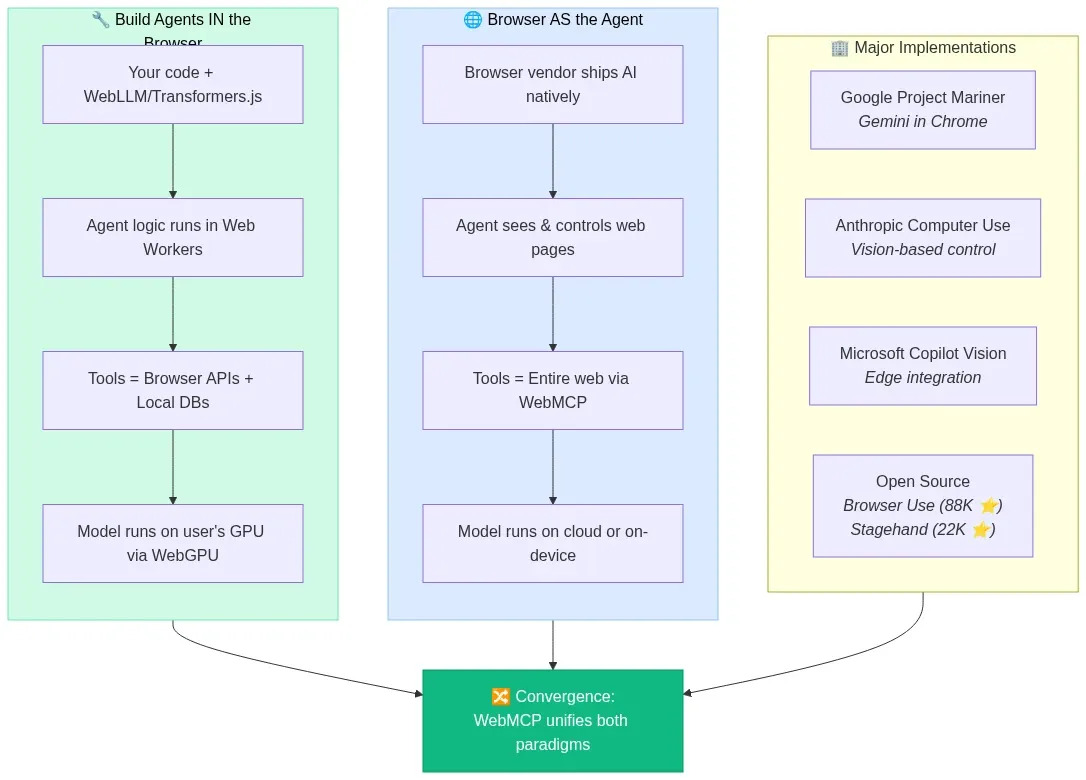
Fig 12: The two paradigms of agentic browsers — building agents in the browser vs. the browser as the agent — wowdata.science
- Google's Project Mariner integrates Gemini directly into Chrome for autonomous web task execution.
- Anthropic's Computer Use demonstrated vision-based browser control as a research preview, now shipping in production.
- Microsoft's Copilot Vision brings agentic capabilities to Edge.
- Open-source frameworks like Browser Use (88,000+ GitHub stars) and Stagehand (22,000+ stars) provide programmatic browser automation powered by LLMs.
The AI browser market is projected to grow from $4.5 billion in 2024 to $76.8 billion by 2034, a 32.8% CAGR. The browser is transitioning from a search tool into an execution environment — and WebMCP is the standard that will make this transition structured rather than chaotic.
Constraints, Trade-offs, and What's Not Ready Yet
Intellectual honesty demands acknowledging what doesn't work yet:
Memory pressure is real. A 3B parameter model at INT4 quantization consumes ~1.7 GB of VRAM. Add a vector database, the web application itself, and other browser tabs, and you're pushing against the limits of 8 GB devices. Memory management — including aggressive KV-cache eviction and model unloading — is essential.
Cold start remains painful. The first visit requires downloading 1-2 GB of model weights. Service Worker caching solves subsequent visits, but the initial experience needs careful UX design (progress indicators, background downloads, graceful degradation to cloud APIs while the model loads).
Model quality has a ceiling. A 3B parameter model running locally will not match GPT-4o or Claude Opus. For complex reasoning, nuanced writing, or specialized domain knowledge, cloud models remain superior. The sweet spot for browser-native models is well-defined tasks: summarization, classification, simple Q&A, semantic search, and structured data extraction.
WebGPU compatibility gaps persist. Safari's WebGPU support remains partial. iOS Safari lacks it entirely. Mobile browsers in general are behind desktop. Applications must implement graceful fallback chains: WebGPU → WebNN → WASM → cloud API.
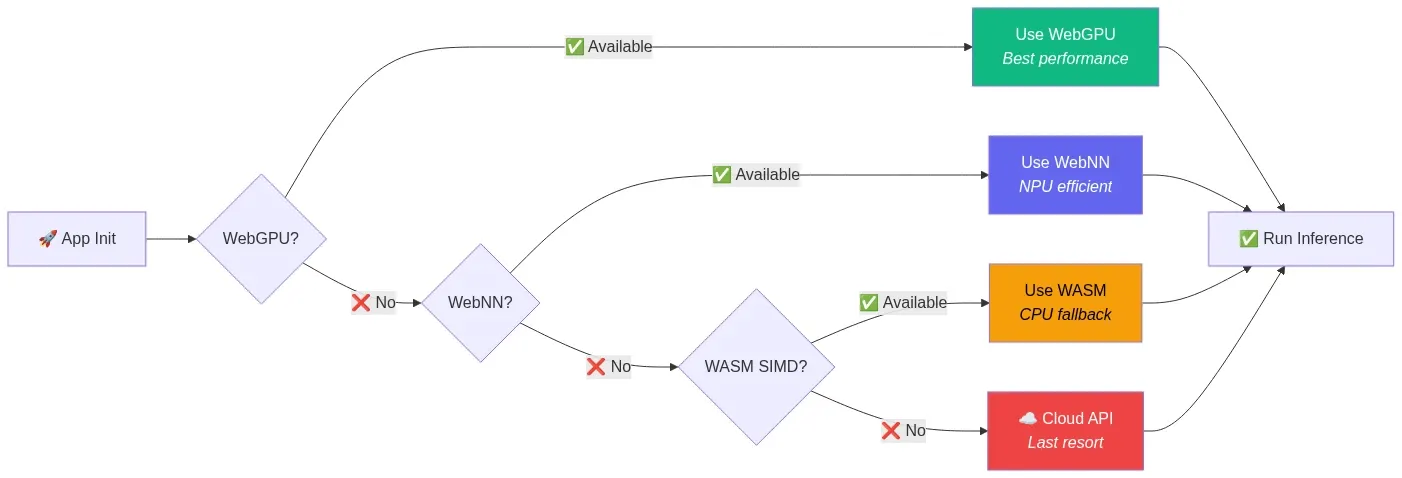
Fig 13: Graceful degradation fallback chain — WebGPU → WebNN → WASM → Cloud API — wowdata.science
Security surface area expands. Running AI models locally introduces new attack vectors: prompt injection through page content, model weight tampering via compromised caches, and data exfiltration through carefully crafted prompts. The browser sandbox helps, but application-level guardrails are still necessary.
What's Coming Next
The trajectory is clear and accelerating:
- WebNN maturation will unlock NPU access across browsers, enabling always-on AI features with minimal power consumption.
- WebMCP standardization through W3C will make structured agent-website interaction a universal web primitive.
- Model distillation continues to compress frontier model capabilities into smaller architectures. The 1B models of 2027 will likely match the 7B models of 2025.
- Speculative decoding and other inference optimizations will push browser-native token generation rates closer to cloud speeds.
- Cross-tab and cross-origin model sharing via SharedWorkers and proposed APIs will eliminate redundant model loading across browser contexts.
- Fine-tuning in the browser via ONNX Runtime Web's on-device training support will enable personalized models that adapt to individual users without any data leaving the device.
Conclusion
The browser-native AI stack in 2026 is not a research curiosity — it's a production-ready architecture with clear economic, privacy, and performance advantages for a well-defined set of use cases. WebGPU provides the compute. WebLLM, Transformers.js, and wllama provide the inference. Chrome's built-in AI provides zero-friction access to Gemini Nano. Small language models from Google, Microsoft, Meta, and Alibaba provide the intelligence. WebMCP provides the structured interface between agents and the web.
The browser was always the most universal runtime. Now it's the most universal AI runtime too.
References and Further Reading
- WebLLM — High-Performance In-Browser LLM Inference Engine — MLC AI
- WebLLM: A High-Performance In-Browser LLM Inference Engine (Paper) — arXiv
- Transformers.js v3: WebGPU Support, New Models & Tasks — Hugging Face
- Transformers.js v4 Guide — Developers Digest
- Chrome Built-in AI APIs — Chrome for Developers
- Prompt API Documentation — Chrome for Developers
- WebMCP Early Preview Program — Chrome for Developers
- WebMCP Complete Guide — A2A Protocol
- WebNN — Web Neural Network API — WebNN.io
- W3C WebNN Specification — W3C
- 3W for In-Browser AI: WebLLM + WASM + WebWorkers — Mozilla AI
- WASM Agents: AI Agents Running in Your Browser — Mozilla AI
- wllama — WebAssembly Binding for llama.cpp — GitHub
- MediaPipe LLM Inference API for Web — Google AI
- Unlocking 7B+ Language Models in Your Browser — Google Research
- nomic-ai/nomic-embed-text-v1.5 — Hugging Face
- Privacy-First Browser AI: WebGPU LLM Inference Without Cloud — Iterathon
- Ship Private, Offline AI in 2025: On-Device LLM Inference — Debugg AI
- Browser AI and WebGPU 2026: Complete Guide — CalmOps
- Sandboxing Agentic AI Workflows with WebAssembly — NVIDIA Developer Blog
- Your Agent Framework Is a Monolith — iKangai
- AI in the Browser: No Server, No Costs, No Privacy Trade-off — Ale Romano
- Small Language Models Complete Guide 2026 — CalmOps
- Best Browser AI Agents 2026 — Firecrawl
- ONNX Runtime Web — Microsoft
- Pyodide — Python in the Browser — GitHub
- WebGPU and WebNN in Modern Browsers — SupportDevs
- In-Browser Semantic Search with PGlite and Transformers.js — Supabase
- Gemini Nano in Chrome 138+ — AI Engineer Guide
- WebMCP Tutorial: Building Agent-Ready Websites — DataCamp
Content was rephrased for compliance with licensing restrictions. All sources are linked for attribution.